How To Install & Activate FreqTube FT1-EMU Plugin
1. I just bought the FT1-EMU Plugin
2.1. I bought it at a dealer
1# You have received a confirmation email with instructions and Licence Key. Copy the licence key.
2# Log in or register a free account at ilok.com and download the iLok Licence Manager
2# Log in or register a free account at ilok.com and download the iLok Licence Manager
3# Go to freqport.com/downloads/
download the Latest Version and Install
(the EMU plugin is part of the FreqTube plugin)
#4 Open up the ILOK Application.
Login and locate the little dots in the upper right corner.
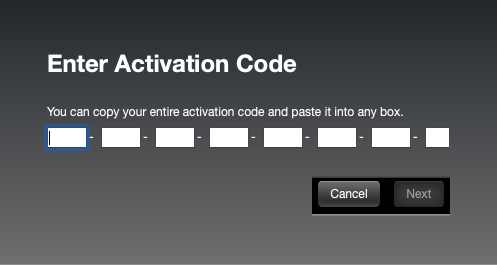
#5 Now paste the key here (you will find the Licence Key in your purchase email)
and hit next, you should now see the Freqtube License in your activated tab
#6 Open up a DAW, locate the Freqtube plugin and start using it.
#7 You can also activate the plugin from the DAW when opening for the first time,
But the ILOK protection can "blacklist" the plugin if the activation is aborted.
Look up your DAW if this happens, and look for "Force Plugin Rescan"
#8 A Trial version is also available if you hit TRY in the ILOK protection Popup
Register on our website for a free Trial Licence Code.
2.1. I bought it from the FreqPort website
1# You have received an order confirmation email with instructions and Licence Key. Copy the licence key.
#2 Or go to FreqPortal freqport.com/freqportal
and find the FreqTube FT1-EMU product in product section (freqport.com/freqportal/registred-products/)
#3 Open up the Freqtube FT1-EMU tab
And copy the long Licence key
#4 Continue with the iLOK activation step.
2. I am a FreqTube FT1 Hardware Owner
2.1. New Hardware Owners - get your licence
#1 Go to Product Registration and register your new FreqTube FT1 Hardware Unit to gain complementary plugin licence in FreqPortal
#2 Register your Freqtube FT1 Hardware Unit
Using the Serial Number from the sticker on the back.
or Hit the big + (plus) Icon under products.
#3 Open up the Freqtube FT1-EMU tab,
And copy the long Licence key
#4 Continue with the iLOK activation step.
2.2. Existing Hardware Owners - access your licence
#1 Go to https://www.freqport.com/freqportal/
Login to Customer Portal
Login to Customer Portal
or Hit the big + (plus) Icon under products.
#3 Open up the Freqtube FT1-EMU tab,
And copy the long Licence key
#4 Continue with iLOK activation step.
3. iLOK Activation
#1 Create a free iLOK account at ilok.com and download the iLok Licence Manager
#2 Open up the ILOK Application.
Login and locate the little dots in the upper right corner.
#3 Now paste the key here (you will find the Licence Key in your purchase email or in FreqPortal for registered users) and hit next, you should now see the Freqtube License in your activated tab
#4 Go to reqport.com/freqportal/freqsoft/ OR freqport.com/downloads/
and choose you Operating System.
Download the Latest Version and Install.
(the EMU plugin is part of the FreqTube plugin)
#5 Open up a DAW, locate the Freqtube plugin and start using it.
#6 You can also activate the plugin from the DAW when opening for the first time,
But the ILOK protection can "blacklist" the plugin if the activation is aborted.
Look up your DAW if this happens, and look for "Force Plugin Rescan"