How To Activate Your FreqLift Plugin Free Trial
1. How Can I Try The FreqLift Plugin
1.1 Request free TRAIL licence
Navigate to freqport.com/product/freqlift_saturation_dynamics_plugin/ and request Trial Activation Key
IMPORTANT! Activating the trial will require ILOK account.
If you do not have an ILOK account, create one for free: Register ILOK account
For the easiness of use, best use the same email for trial activation and for ILOK account.
If you do not have an ILOK account, create one for free: Register ILOK account
For the easiness of use, best use the same email for trial activation and for ILOK account.
1.2 Your FreqLift Trial Key Is On Its Way
Check your inbox for the email containing FT1-EMU trial licence.
If the email doesn't appear within a minute, please check your SPAM or promotions folder.
1.3 ILOK activation
Open up the ILOK Application on your computer.
If you do not have iLok Licence Manager, log in or register a free account at ilok.com and download it.
If you do not have iLok Licence Manager, log in or register a free account at ilok.com and download it.
Login to application and locate the little dots in the upper right corner.
1.4 Inserting Activation Key
Now paste the key here (you will find the Licence Key in your purchase email)
and hit next, you should now see the Freqtube License in your activated tab.
1.5 Check if the Trial Licence is Activated in the right side.
You get 1 trial activation - trial licence for one device (purchased plugin has 2 activations).
2. Activating FreqLift plugin
2.1. Download Plugin
We recommend choosing the newest beta version.
2.2 Install Plugin
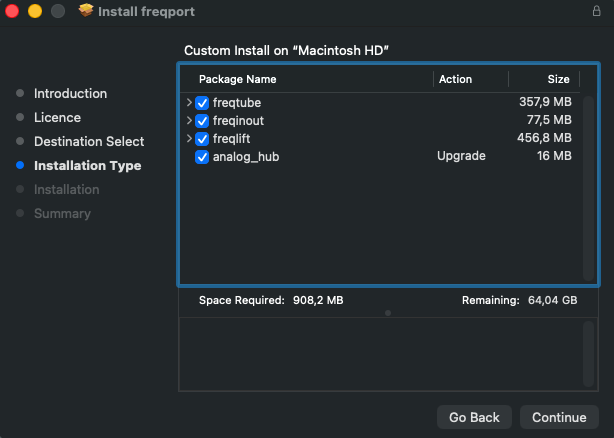
The Freqport installer contains:
- Analog Hub software
- drivers and
- all Freqport plugins
If you do not own a Hardware Unit, and only
want to try out the FreqLift Plugin
You only need to install the FreqLift Plugin
want to try out the FreqLift Plugin
You only need to install the FreqLift Plugin
2.3 Using the FreqLift plugin
Open up your preferred DAW,
locate the Freqtube plugin and start using it.
2.4 TROUBLESHOOTING
You can also activate the plugin from the DAW when opening for the first time,
But the ILOK protection can "blacklist" the plugin if the activation is aborted.
Look up your DAW if this happens, and look for "Force Plugin Rescan"